General
What countries is LifeOnRecord
available in?
Is there a time limit on the length
of a message?
Tell me about the audio
discs
Pricing & Shipping
What is your pricing?
What are your shipping
charges?
Can I upgrade my shipping after I
order?
What is your refund
policy?
Downloading my recordings and making a CD with
iTunes
How do I download my recordings directly to my iPad or iPhone?
If I download my recordings using
iTunes, can I still have you make a CD for me as
well?
How do I download my recordings into
iTunes on my Windows PC or Macintosh?
How do I make a CD with
iTunes?
Can I accidentally
delete my recordings by using iTunes?
Advanced iTunes Tips
iTunes
Troubleshooting
LifeOnRecord Events & LifeOnRecord
Weddings
What do callers hear when
they call the toll-free number?
What are some tips to ensure
we get as many people to call as possible?
What should we say in our
personal greeting?
Are there limits on how often we or
our guests can call in?
I'm having a wedding - can I
choose LifeOnRecord Events?
When will my CDs be
created?
When should I sign-up?
Are there any restrictions on the
toll-free number?
Personal Voice Journal
Do you have any tips for
audio journaling?
Can I ask friends
and family to leave me stories on my personal journal
number?
Is there
a minimum subscription length for LifeOnRecord
Journals?
Security & Privacy
Are my journal
entries private?
Will you try and market your
services to my callers?
GENERAL
What
countries is LifeOnRecord available in?
Callers from the US, Canada, and Caribbean can call toll-free: 1-800-606-0697.
Callers from outside the US, Canada, and Caribbean have several options:
- Callers can phone-in from other countries as well by dialing 1-800-606-0697 using Skype (this is treated as a free call in most countries). If you are in a country that does not allow free Skype calling to toll free numbers, you can instead make a free call to the Skype name "LifeOnRecord2" which will route you to the same place as the toll-free number.
- Callers can dial the US number 1-847-943-2021 (+1 847 943 2021), but they will pay a long distance
charge to their local phone company. The 1-847-943-2021
number is a local Illinois phone number that
routes directly to the LifeOnRecord service. It can be
called from another country just like any other US
telephone number as long as the applicable US Country
codes are dialed as well.
We are not affiliated with this web site, but here is a tool that will let you determine
what the US dialing codes are from another country.
- Callers can dial one of the local country phone numbers listed below which route directly to LifeOnRecord. If you do not see your country listed below, contact us and we may be able to obtain a number for you.
| Country |
If you were asked to call and leave a recording |
If you are the subscriber/coordinator and are recording your introductory greeting for callers. |
| Argentina |
+54 351 568 5711 |
+54 351 568 5712 |
| Australia (Brisbane) |
+61 7 3171 3588 |
+61 7 3171 3587 |
| Australia (Perth) |
+61 8 6555 7073 |
+61 8 6555 7071 |
| Austria |
+43 1 229 7479 |
+43 72 096 3914 |
| Belgium |
+32 78 48 03 74 |
+32 78 48 03 46 |
| Brazil |
+55 (21) 4040-4309 |
+55 (21) 4040-4374 |
| Canada |
1 (800) 606-0697 |
1 (800) 931-3925 |
| Chile |
+56 22 938 0198 |
+56 32 314 0886 |
| China |
+86 22-58858947 |
Not Currently Available |
| Colombia |
+57 (1) 381-9113 |
+57 (1) 381-9947 |
| Czech Republic |
+420 226 258 118 |
+420 226 258 126 |
| Denmark |
+45 78 77 41 75 |
+45 78 77 43 10 |
| Dominican Republic |
1-829-954-8380 |
Not Currently Available |
| Ireland |
+353 (76) 604 2713 |
+353 (76) 604 2714 |
| Israel |
+972 (2) 560 9387 |
+972 (2) 560 9388 |
| Mexico |
+52 (55) 4170 8549 |
+52 (55) 4170 8548 |
| Netherlands |
+31 20 894 25 28 |
+31 20 894 25 34 |
| New Zealand |
+64 9 951 5827 |
+64 9 951 5828 |
| Norway |
+47 21 98 88 45 |
+47 21 98 88 46 |
| Peru |
+511 720 7516 |
+511 641 9276 |
| Poland |
+48 22 490 69 08 |
+48 22 490 69 02 |
| Romania |
+40 (31) 811 09 08 |
+40 (31) 810 77 18 |
| South Africa |
+27 (10) 5001854 |
+27 (10) 5001858 |
| Spain |
+34 931 770 597 |
+34 931 770 598 |
| Sweden |
+46 8-121 111 45 |
+46 8-121 111 38 |
| Switzerland |
+41 22 508 71 75 |
+41 22 508 71 56 |
| United Kingdom |
+44 20 3411 0478 |
+44 20 3582 4356 |
| United States |
1 (800) 606-0697 |
1 (800) 931-3925 |
back to top
Is
there a time limit on the length of a
message?
For all of our products, the maximum time limit on the
length of an individual message is 30 minutes. We want to
encourage people to leave meaningful stories and thoughts
and so there are no limits on how often people can call
in, or on the total number of callers or recordings.
back to top
Tell
me about the audio discs
To keep the pricing simple and straightforward, we
charge you the same amount regardless of the number of
discs it takes to fit your recordings. A personalized
message is printed directly onto the CD face (there is no sticker). We use a
premium printing process that gives your CDs a durable,
waterproof, glossy finish.
For LifeOnRecord Weddings and Events, each set of CDs
we send to you is packaged in a hinged, metal case which
protects the CD. A clear plastic window in the case
allows viewing of the CD title.
The CD media we choose is of the highest quality and
conforms to the specifications for durable, long lasting
archives. Accelerated aging tests from the manufacturer
guarantee storage for more than 100 years.
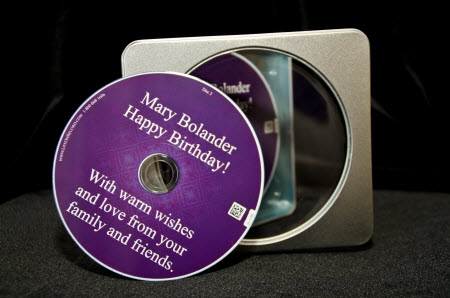
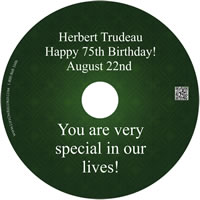 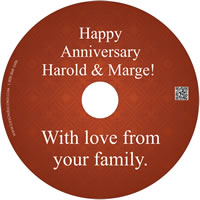 
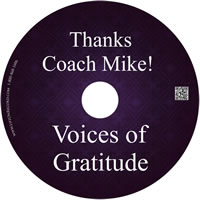 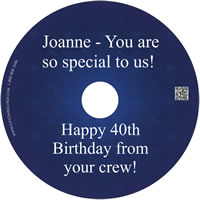 
You can choose your CD background, and the personalization. You can write as little or as much on the CD as you'd like - We auto-size the font to make sure everything fits. The CDs have a small barcode on the right which can be read by many smartphones so if the CD is lost, the recipient can be identified by the bar code. The bar code also aids in the quality control process when we create the CD set.
back to top
PRICING & SHIPPING
What is
your pricing?
LifeOnRecord pricing
back to top
What are
your shipping charges?
When you are ready for us to create your CD, just send
us an email. We create your CD, print your desired
message on it, and ship your package the next business
day. Your package will be shipped the next business day
as long as we receive your email requesting the CD by 3PM
Central time.
For example, if we receive an email from you on a
Sunday by 3PM Central time asking us to create the CD,
the CD will be mailed on Monday. After that point,
shipping time is determined by your chosen shipping
method.
Standard shipping (USPS First Class MAil) is free. Shipping time generally takes 3-5 days transit time in the US, but there is no guaranteed delivery timeframe with First Class mail. Deliveries to countries outside the United States, including Canada will take longer than 3-5 days.
You can also upgrade to FedEx 2-Day or Next Day Service. In the US, upgrading to FedEx 2-Day Service will cost $18.00, and upgrading to Next Day service will cost $21.50. FedEx Next Day Service may take longer than one day if the shipment is going outside the US.
Shipping for LifeOnRecord Journals is included in the
price.
back to top
Can I
upgrade my shipping at a later date?
Yes, if you originally purchased standard shipping, you can follow this link to upgrade your shipping. The upgrade price takes into account the price you paid for standard shipping.
back to top
What is your refund
policy?
Your peace of mind is important to us. If you don't
think your purchase of LifeOnRecord was worth it, we'll
cheerfully refund your money.
For LifeOnRecord Weddings and Events, you can cancel
at any time and receive a full refund. For the personal
journal subscription, you can cancel within the first 14
days and receive a full refund. After that we'll refund
your purchase price, less the monthly rate for the length
of time you had the subscription rounded up to the next
month.
For example, if you purchased a one-year subscription
and cancel after 25 days, we'd refund you for 11
months. If you cancel after 50 days (for example),
we'd refund you the remaining 10 months of your
subscription.
back to top
DOWNLOADING MY RECORDINGS AND MAKING A CD WITH
iTUNES
How do I
download and play my recordings directly to an iPad or iPhone?
- Open the Podcasts App on your iOS device. If necessary, you may need to install it from the App store (it’s free).
- On your iOS device, login to the My Recordings page click the "subscribe to the podcast" link found under Tip #2. If you get a warning message about a "Possible "Phishing Site", just tap on "Ignore this Warning". You are clicking the link from behind a password protected site, so you are safe.
- You will get a box asking if you’d like to subscribe to the podcast. Tap on “Subscribe”
- It may take a minute or two, but you should see that a podcast was added with the recipient's name. Tap on that, and then tap on “add Old Episodes”.
- Click on the circle to the left of each recording so that a checkmark appears, then click on the “Add” button in the top-right.
- All the recordings will download. When complete, tapping on one of the recordings will make it play.
back to top
If I
download my recordings using iTunes, can I still have you
make a CD for me as well?
Yes. Every LifeOnRecord package includes the ability to
make your own CD using iTunes. You can download
recordings into iTunes at any time you want, and not
interfere with our ability to make your CD.
back to
top
How do I
download my recordings to my Windows PC or Macintosh?
You can download your recordings individually from the "My Recordings" page without requiring iTunes or any other software. Alternatively, you can download your recordings all at once into iTunes. iTunes is a free program for PCs and Macs and gives you
the ability to download your recordings to your computer,
burn CDs, and copy your recordings to MP3 players. There
is no cost to use iTunes. Your LifeOnRecord recordings
will appear in iTunes as a "podcast", and downloading
your recordings is simple. With iTunes each recording
gets downloaded as a separate "track" and you will be
able to arrange your recordings any way you wish. You can
even add your own music between the recordings if you
desire.
- If you don't already have iTunes on your computer, Install iTunes by going go to Apple's iTunes download
site.
- After iTunes installation is complete, log into
your personal LifeOnRecord web
site.
- Click the
“download all your recordings” link, which is found in Tip#1 near the top of the
page.
- After iTunes launches on your computer, click the chooser at the top-left and select “Podcasts”.
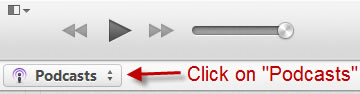
Then click on the word "My Podcasts" at the top of the screen.

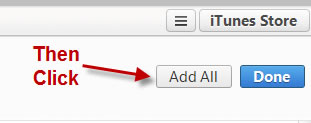
- It may take a minute or two, but wait until the you see your invitation number and the recipient's name appear. Click the "Old Episodes" button on the right side of the screen, then click on "Add All".
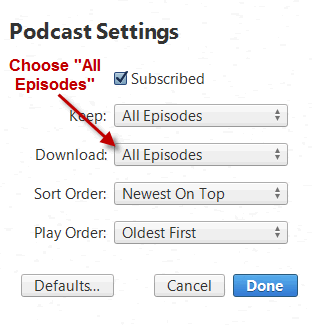
- Click the Settings button.

- Where it says, "Download" choose "All Episodes", then click "Done".
- Clck the word List at the top of the page

- Click on the triangle to the left of the invitation number so it points downward. You will see all your recordings.

- Click on the download button to download all your
recordings. This button will be directly to the right of the recipients invitation number and name.
 . When prompted if you want to download all the recordings, answer "Yes". . When prompted if you want to download all the recordings, answer "Yes".

Now, whenever you launch iTunes your newest recordings will automatically download to your computer.
back to top
How do I
make a CD with iTunes?
- In iTunes click on the word "My Podcasts" at the top of the screen.
- To the right of the recipient name, click on the right chevron symbol
 , then click on "Add To", then choose "New Playlist". , then click on "Add To", then choose "New Playlist".

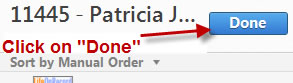
- Press the <Enter> key on your keyboard to lock-in the name of the playlist, then click the "Done" button.
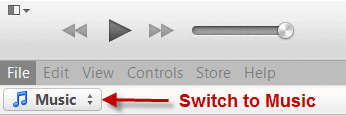
- Click on the chooser at the top-left and select "Music".
- If you'd like to delete a recording from appearing
on the CD, just click on it when you're in the
playlist, and press the <Delete> key.
- Drag the recordings so they are in the order that
you'd like on the CD.
- Right-click (or if you are on a Macintosh
Control-Click) on the playlist name on the left side, and choose “Burn Playlist to Disc”.
back to top
Can I accidentally delete my recordings by
using iTunes?
No. Your recordings are stored on our server, and
nothing you do in iTunes can permanently delete the
recordings from our server. In addition, to give
you maximum piece of mind you can't even delete your
recordings from your "My Recordings" web page. You can
choose to exclude a recording from appearing on your CD,
but you can't permanently delete a recording from our
servers. Even if you go into iTunes on your computer and
delete your copy of the recordings, you can just
re-download the recordings to iTunes. To do that, follow
these two steps:
- If you deleted your recording from the Playlist
section, re-drag the recording(s) from the podcast into
the playlist.
- If you deleted your recording from the Podcast,
collapse the Podcast (click on the triangle to the left
of the words "Recordings for...") and then hold down
the <Shift> key and click on the triangle again.
Your deleted recordings will re-download.
back to top
Advanced iTunes Tips
- If you categorized your recordings into folders in
your "My Recordings" page, you can display those same
folders in iTunes as a reference. Here's how you do
that:
- In iTunes after creating your playlist,
right-click (or if you are on a Macintosh
Control-Click) on the area that has the column
headings (Name, Time, Artist, etc.). From the
list that appears, choose "Description".
- Your LifeOnRecord folders will now display next
to the recordings. You can reference the folders to
decide how to sort the recordings, or what to
delete.
- To automatically sort your recordings by the folder, and then within each folder by date
follow these steps:
- In iTunes after creating your playlist,
right-click (or if you are on a Macintosh
Control-Click) on the area that has the column
headings (Name, Time, Artist, etc.).
- From the list that appears, choose "Description". You can click on the new "Description"
column heading to sort on it. Your recordings will be sequenced by the folders, "First", "Group 1" through "Group 50", "INBOX", then "Last". Within each folder your recordings will be sequenced from oldest to newest.
- If you are using Microsoft Windows, and you want to
access the recordings directly to incorporate then into
a video or slide show, the recordings are stored in the
My Documents\My Music\iTunes\iTunes Music\Podcasts
directory.
back to
top
iTunes Troubleshooting
- If you can't get your recordings to download, the
problem may be that you entered the wrong ID and
Password in iTunes. Your ID is your LifeOnRecord
Invitation number or Journal number and your password
is your numeric password that we sent you in your
welcome email (or the password you changed it to).
- Sometimes if you mistype your LifeOnRecord ID and
password into iTunes you have to delete the existing
podcast and re-initiate the download. To do that follow
these steps:
- Go into iTunes and click on the "Podcasts"
link.
- From the iTunes menu, choose View\As List.
- Place your mouse on where it says "Recordings
for..." and <right-click> (or on a Macintosh
<control-click>). From the menu choose
"Delete" and delete the Podcast.
- Exit from iTunes.
- Go back to your "My Recordings" page and click
on the "download" link to re-initiate the process
of downloading your recordings.
- Click the small triangle to the left of
"Recordings for..." to expand your list of
recording titles.
back to top
LIFEONRECORD EVENTS AND LIFEONRECORD
WEDDINGS
What do callers hear when they
dial the toll-free number?
They will hear a short introduction letting them know
their comments will be recorded as part of the
LifeOnRecord service. Then they will hear a personalized
greeting from you, in your own words, asking them to
share their favorite jokes, memories, stories - whatever
you want. The personalized greeting is usually recorded
by:
For LifeOnRecord Events
- The party planner for events like anniversaries,
retirements, birthdays and reunions.
- The parents of the teenager going through a
confirmation, Bar Mitzvah, Bat Mitzvah, or
graduation.
- A friend or loved one for a funeral or on behalf of
someone who is sick.
For LifeOnRecord Weddings
- The bride and/or groom.
- The best man and/or maid of honor.
- The parents of the bride or groom.
Those are general guidelines, but the choice is
yours.
back to top
What are some tips to
ensure we get as many people to call as
possible?
- Communicate the phone number in your save the date
letters and invitations. Make sure to tell people to
call in even if they can't attend the event
itself.
- Make sure you give people a deadline.
- You may want to communicate a "fake" deadline. You
or someone else can monitor the web site to see who has
called, and when the first deadline passes, gently
remind people that they have another day or two.
- At the actual event, have someone make an
announcement that the lines will "stay open" for the
next few days, and people can call in again if they
would like to share more stories about the event
itself. You can also have place cards that remind
people to call the number, or ask them to call the
number again.
- If you are throwing an event where you don't want
people to bring presents, you can write in the
invitation, "in lieu of gifts, please share your
favorite story or memory with ____ by calling...."
When communicating deadlines, keep in mind that if you
are having LifeOnRecord create CDs, we ship out CDs the
next business day, but the guest of honor can listen to
their recordings over the internet at anytime.
back to top
What should we say in our personal
greeting?
This is a sample greeting that you can use "as is" or
modify:
We’re putting together a
keepsake CD for <Name> that contains stories and
messages from family and friends to celebrate
<Occasion>. Please share a quality, trait,
or talent of his/hers that you admire, a favorite story
or memory you have of <Name>, or why you think
he/she is special. If you'd like some inspiration you
can go to www.LifeOnRecord.com and click on the
"callers tips" link in the top right of the page. You
will have up to 30 minutes to leave your recording and
you can call as often as you want.
If you like, you can also be very specific with your
callers and tell them the kind of message you want them
to leave. Some examples are:
Weddings & Anniversaries
- "We'd like you to share your favorite story about
the couple.
- "What do you think the couple will be doing in 10,
20, and 30 years from now."
- "Is there a song that you think the couple reminds
you of?
Birthdays, Graduations, Mitzvah's
- "What was your most memorable moment with
<Name> over the past year."
- (Reunion) "What is your favorite story of your time
at high school/College?"
- "What private joke or song do the two of you
share?"
- "What did <Name?> do in the past that most
impressed you."
- "For his Bar Mitzvah, please tell name what you think it means to be a man in the Jewish
tradition."
- "What do you think is the favorite quality of name and why do you value that?
Baby Shower, New Baby, 100 Wishes
- Please tell <Parents> your favorite
nugget of parenting care advice".
- "What is your wish for the new baby"?
back to top
Are
there limits on how often we or our callers can call
in?
No. They can call as often and talk as long as you
want. We want to make this simple for you, and we want
you and your callers to use the service as much as you
want to record thoughts and memories.
back to top
I'm having a wedding, can I choose
LifeOnRecord Events?
Yes, the wedding package bundles together three sets
of keepsake CDs, but you can choose LifeOnRecord Events
instead.
back to top
When will my CDs be
created?
The CDs are
created at your request, and are typically shipped out the next
business day (M-F).
Shipping time is based on the shipping method you select.
Prior to requesting the CDs make sure that you've used
the web site to indicate the order of the CDs and to
exclude any recordings that you don't want to appear on
the CD. The default order oldest to newest (the first call is the
first recording on the CD, and the last call is the last
recording), but on the web site, you can sequence the recordings in any way you want. .
back to top
When should
I sign-up?
You have nothing to lose by signing up early. The
number and web site will become active minutes
after you sign up for the service, and your account will
expire after one year, at which point callers
will no longer be able to leave messages and you will not be
able to play your recordings from the web site or
download them into iTunes.
The order in which things happen are:
- You sign-up for your LifeOnRecord account and
receive your account information.
- Using your phone, you record your personal greeting
(what your guests hear when they call in).
- You communicate your LifeOnRecord telephone number
and invitation number to callers.
- Everybody calls in.
- You notify us that you would like your CDs
created.
- Your account stays open for 1 year after your sign-up date.
back to top
Are there any restrictions on the
toll-free number?
The US toll-free number is not accessible from
countries outside the United States and Canada, but it is accessible for callers in other countries that use Skype (as a free call).
Callers can also phone-in from other countries by dialing
847-943-2021, but they will pay a long distance charge to
their local phone company. The 847-943-2021 number is a
local "land line" Illinois phone number that routes
directly to the LifeOnRecord service. It can be called
from another country just like any other US telephone
number as long as the applicable US Country codes are
dialed as well.
We are not affiliated with this web site, but here is a tool that will let you determine
what the US dialing codes are from another country.
back to top
PERSONAL JOURNAL
Do you have any tips for audio
journaling?
Here are three things that will help you get the most
out of audio journaling:
- Add your LifeOnRecord number to your phone's speed
dial. If you have a separate journal number, add a
pause and then add the journal number as well.
- Get in the habit of calling during a certain part
of the day. Your journal is a phone call away, so it
can be anytime you have a few minutes. It can be during
a commute, while taking a daily walk, or right after
you wake up.
- If you're out with a friend and they tell a funny
story, call your number, hand the phone to them, and
have them re-tell it on-the-spot, in their own words.
It makes for a special memory for both of you.
back to top
Can I ask
friends and family to leave me stories on my Personal
Journal number?
Part of the appeal of a LifeOnRecord Personal Journal
is that you can invite your close friends and family to
contribute to it, however the journal is still private,
and others won't know what your journal contains. The
terms of use allows you to let up to 10 other people call
into your journal in any one month and share stories and
memories. If you have a need for a wider group of people
to contribute, you should subscribe to LifeOnRecord
Events.
back to top
Is there a minimum subscription
length for LifeOnRecord Journals?
The minimum subscription period is two months. There
is no maximum subscription length.
back to top
SECURITY / PRIVACY FAQ's
Are my journal entries
private?
We understand that you might be recording your deepest
thoughts and sentiments with a LifeOnRecord Journal. Your
privacy is our top concern, and we employ measures to
ensure your information remains confidential.
- Your recordings are stored on servers in a secure
environment with locked doors, surveillance cameras,
and electronic monitoring. We employ encryption and
password protection. The web site which you access
requires a User ID and password, and the files are
streamed to you over an encrypted connection.
Downloading the journal entries to iTunes requires you
to first enter a user ID and password.
- Nobody at LifeOnRecord will listen to your journal
entries without your consent. The process to create
audio discs is automated and listening to your
recordings is not required or done. We will only listen
to a recorded message if it's in the context of a
specific support question you have or if we have reason
to believe the terms of service are being
violated.
- We will occasionally look at customers call logs if
there is unusual activity to ensure that the terms of
service aren't being violated (e.g. a personal journal
being used for a large event). Customer call logs
consist of caller ID information and call duration -
they do not consist of call recordings.
We take steps on our side to ensure your privacy, but
we also want you to know that there are two areas that
are under your control where you need to be cautious:
- Once files are downloaded to your computer, unless
you take further measures, they are accessible by
anyone that uses your computer.
- If you make yourself a CD, or have us send you a CD
in the mail, you should secure it properly since anyone
that has access to the CD can listen to it.
back to
top
Will
you try and market your services to my
callers?
We know that you want this be convenient for your callers,
and you are concerned about anyone soliciting them.
For LifeOnRecord Weddings and LifeOnRecord Events, we
do not call, postal mail, or email your guests unless you
actively request that we do.
We do not sell or give your information to other
companies, except in direct connection with supplying the
LifeOnRecord service (e.g. we need to pass your payment
information to our credit card processor). Nobody
connected with LifeOnRecord will solicit you, or sell or
give away your email addresses
back to top
|


